Jun 09, 2026
You often work with electronic devices that require different cables for power, charging, and data transfer. The most Useful Cables include:
USB-C to USB-A Cable – Connects modern devices to older computers or chargers.
Multi-Charging Cable – Supports USB-C, Lightning, and Micro USB for versatile charging.
HDMI Cable – Delivers high-quality audio and video between devices.
Micro USB Cable – Powers and syncs many small electronics.
USB-C to HDMI or DisplayPort Cable – Links devices to external displays.
Lightning Cable – Charges and syncs Apple devices.
Knowing the most useful cables helps you pick the right cable for your specific device and application.
Key Takeaways
Choose cables based on device compatibility and performance needs.
Use shielded cables to minimize interference in high-EMI environments.
Select fiber optic cables for high-speed and long-distance data transfer.
Most Useful Cables for Electronics
Essential Cable Types Overview
You interact with many cable types when working with electronic products. Industry experts highlight these as the most useful:
Power cord: Delivers electricity to computers, monitors, and appliances.
HDMI cable: Transfers high-definition video and audio for multimedia devices.
USB cable: Connects and powers smartphones, tablets, and laptops.
Audio cable: Sends sound signals to headphones, speakers, and sound systems.
Charging cable: Powers portable electronics and wearables.
The table below shows the main uses for each essential cable type:
Cable Type
Main Uses
Power Cord
Computers, monitors, printers, household appliances, portable electronics
HDMI Cable
TVs, projectors, gaming consoles, home theater systems
USB Cable
Smartphones, tablets, laptops, external hard drives, printers
Audio Cable
Headphones, speakers, professional sound systems, home theater setups
Telephone Cable
Landline phones, DSL internet, intercom systems
Charging Cable
Smartphones, tablets, laptops, wearable devices
Choosing the Right Cable
You need to consider several factors when choosing the right cable for your device. Start by checking protocol support and speed ratings. Look for clear labels such as “USB 3.2 Gen 2” or “HDMI 2.0” to match your performance needs. Pay attention to cable length, as longer cables can reduce signal quality. Select cables with strong build quality and strain relief to prevent damage. Certification and compatibility matter for safety and reliability. Environmental conditions, such as heat or interference, also affect your choice. For network connections, always use cables that meet the latest standards to ensure stable performance. By focusing on these criteria, you make choosing the right cable simple and effective for any application.
Power Cable Types
Standard Power Cables
You encounter standard power cables every day when you use computers, monitors, and office equipment. The IEC C13/C14 cable is one of the most common choices for these devices. The C13 connector plugs into your device, while the C14 connects to the power source. This cable supports up to 10 Amps and 240V, making it safe for a wide range of electronics. Detachable power cords, also called line cords, offer flexibility because you can easily replace them if damaged. Always check the voltage and amp ratings, connector type, and certifications before selecting a cable for your device.
Testing and validation are critical to ensure cable assemblies meet performance requirements. Electrical tests like continuity and insulation resistance confirm operational integrity, while mechanical tests verify durability under physical stress. Environmental tests assess performance in challenging conditions, ensuring reliability in various applications.
The National Fire Protection Association (NFPA) maintains standards that impact cable selection, particularly regarding fire safety. NFPA 70 sets baseline requirements for flame resistance, while NFPA 262 evaluates flame propagation height. Fire alarm cables must comply with NFPA 72 to ensure functionality during a fire. Specialized standards like NFPA 79 for industrial machinery and NFPA 99 for healthcare facilities dictate specific cable requirements relevant to their applications.
UL certifications ensure safety benchmarks like fire resistance and insulation performance.
RoHS compliance ensures no hazardous materials are used in cable designs.
Specialty Power Cables
For demanding environments, you need specialty power cables that deliver advanced performance. The ARX-9 FRW Cable and High Tensile Flexible NBR EPDM Rubber Cable stand out for their durability and resistance to harsh conditions. The table below highlights their key characteristics:
Characteristic
ARX-9 FRW Cable
High Tensile Flexible NBR EPDM Rubber Cable
Temperature Range
-40 to 200°C
Suitable for wet and dry environments
Short Circuit Overload
Up to +300°C
Not specified
Current Carrying Capacity
High
Not specified
Resistance
High resistance to thermal pressure, chemicals, hydrolysis, and weathering
Not specified
Flame Retardant
Yes (UL VW-1, FT4, FT6)
Not specified
Flexibility
Flexible minimum outer diameter
Not specified
Applications
Motor winding, pump cables, marine and industrial applications
General use in wet and dry environments
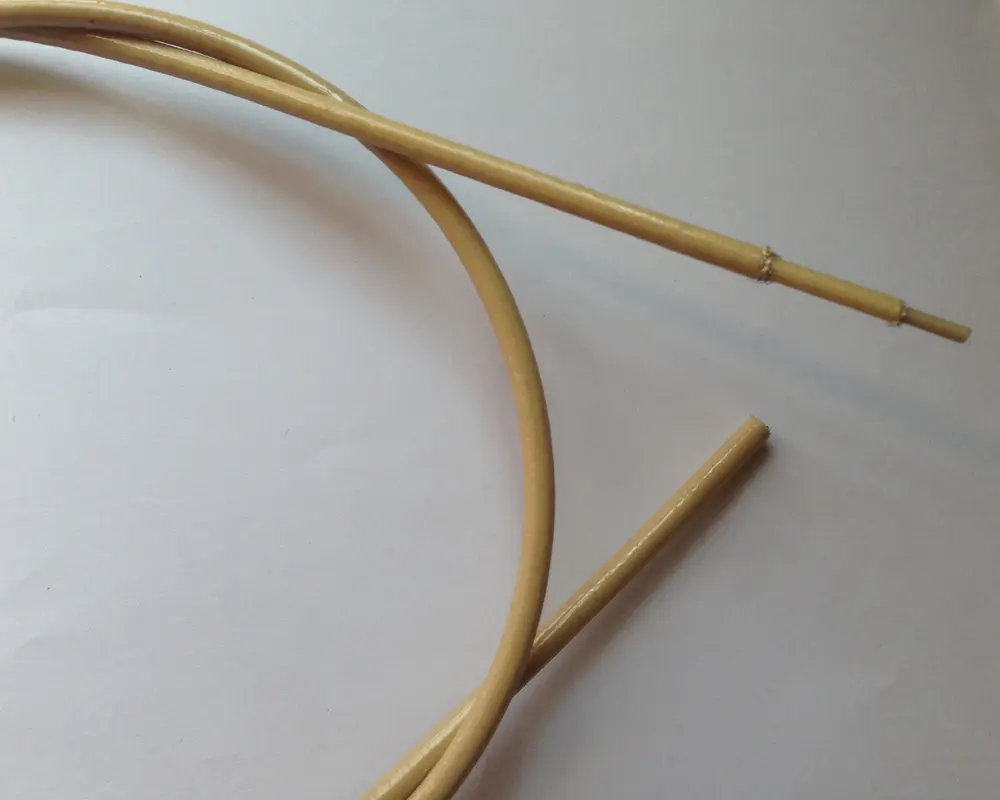
You can also choose the CITCABLE Flexible Fluoropolymer Cable for projects that require exceptional weather, heat, and chemical resistance. This cable performs reliably in automotive, marine, and industrial machinery, even in extreme conditions. When you select a specialty cable, always match its features to your application for maximum safety and performance.
Data and Network Cables
Ethernet and Network Cables
You rely on ethernet cables to build a stable and fast network for your devices. These cables connect computers, routers, switches, and servers, forming the backbone of most wired networks. You find several categories, such as Cat5e, Cat6, Cat6a, Cat7, and Cat8, each offering different speeds and shielding levels. Ethernet cables support high-speed data transfer, reduce interference, and ensure reliable communication for home and office internet, gaming consoles, and smart TVs.
Tip: Choose a cable category that matches your speed requirements and device compatibility.
Here is a comparison of popular ethernet cable types:
Cable Type
Max Data Transmission
Max Bandwidth (MHz)
Max Distance
Cat5e
1 Gbps
100 MHz
100m
Cat6
10 Gbps (up to 55m)
250 MHz
100m (1 Gbps)
Cat6a
10 Gbps
500 MHz
100m
Cat7
10 Gbps
600 MHz
100m
Cat7a
40 Gbps (limited distance)
1,000 MHz
30m
Cat8
40 Gbps
2,000 MHz
30m
You use network cables for structured connectivity in IT infrastructure, data centers, and video conferencing. Fiber optic cables also play a role in high-speed data transmission, especially for long distances and environments with electromagnetic interference.
USB Cable Types
You encounter several USB cable types when connecting peripherals and charging devices. Each type serves a specific purpose:
USB Type-A: Standard connector for PCs and laptops.
USB Type-B: Used for printers and some external drives.
USB Mini-B: Found in older cameras and early smartphones.
USB Micro-B: Common in Android phones and portable electronics.
USB Type-C: Modern, reversible connector for fast data and power delivery.
The table below summarizes the main differences between USB versions:
USB Version
Speed/Transfer Rate
Power
Max Cable Length
USB 1.1
12 Mbit/s
N/A
3 Meters
USB 2.0
480 Mbit/s
5V, 1.8A
5 Meters
USB 3.0
5 Gbit/s
5V, 1.8A
3 Meters
USB 3.1
10 Gbit/s
20V, 5A
3 Meters
USB 4.0
40 Gbit/s
100W
N/A
You benefit from USB Type-C’s versatility, which supports both high-speed data transfer and power delivery for modern devices.
Audio and Video Cable Types
HDMI and DisplayPort Cables
You often use hdmi cables and dvi cables to connect your devices for high-quality video and audio. Hdmi cables work with TVs, monitors, projectors, gaming consoles, and home theater systems. DisplayPort cables provide another option, especially for professional and gaming setups. Both hdmi and DisplayPort support high resolutions and refresh rates, but their features differ.
The table below compares the main specifications of hdmi and DisplayPort cables:
Specification
HDMI 2.0
HDMI 2.1
DisplayPort 1.4
DisplayPort 2.0
Bandwidth
18 Gbps
48 Gbps
32.4 Gbps
77.37 Gbps
Resolution
4K at 60Hz
4K at 120Hz, 8K at 60Hz
4K at 120Hz, 8K at 60Hz
8K at 120Hz, 16K at 60Hz
Multi-Monitor
Limited
Limited
Supports MST
Supports MST
VRR Support
Yes
Yes
Yes
Yes
G-SYNC Support
No
No
Yes
Yes
Hdmi cables are more common in consumer electronics, while DisplayPort excels in multi-monitor setups. Dvi and dvi cables still appear in older monitors and projectors, but hdmi cables offer broader compatibility and advanced features.
Audio Cables
You rely on audio cables to connect headphones, speakers, and sound systems. The most common types include 3.5mm, RCA, and XLR cables. Each cable type serves a unique purpose in audio setups.
Cable Type
Key Features
Applications
3.5mm
Versatile, widely used, compatible with various devices
Headphone connection, auxiliary input, gaming headsets, home theater systems
RCA
Two connectors (red and white), bridges different audio devices
Connecting DACs to amps, DJ equipment, older audio gear
XLR
Locking mechanism, rubber insulation, clear signal transmission
Microphones, PA systems, stage speakers, DMX lights
You should choose the right cable based on your device and sound quality needs. Hdmi cables can also transmit audio, making them a flexible choice for home theaters.
Coaxial Cable Types
TV and Internet Applications
You rely on coaxial cables for many home and business electronic setups. These cables play a vital role in delivering television and internet services. Most TV and internet installations use coaxial cables with a 75-ohm impedance. RG-6 and RG-59 are the most common types for transmitting audio and video signals. RG-6 stands out for high-definition and ultra-high-definition content because it offers lower signal loss over longer distances.
Tip: Choose RG-6 for modern TV and internet connections to ensure the best signal quality.
You will find coaxial cables in several applications:
Cable television connections
Broadband internet service from your provider
CCTV surveillance systems
Satellite and antenna installations
The table below highlights the main types of coaxial cables and their uses:
Cable Type
Impedance
Application
RG-6
75 Ohm
Cable TV, Satellite, Internet Modem
RG-11
75 Ohm
Long-distance video, CATV systems
RG-8
50 Ohm
Amateur radio, Ethernet
Coaxial cables use multiple shielding layers to block electromagnetic interference. This design keeps your signal strong and reliable, even in environments with electrical noise. The durable construction resists physical damage and environmental wear, so you can count on long-term stability. You also benefit from the ability to support TV, internet, and phone services with a single cable, which simplifies your wiring setup.
Fiber Optic Cable Applications
High-Speed Data Transmission
You rely on fiber to achieve rapid and reliable data transfer in modern electronic systems. Fiber optic cables use light pulses instead of electrical signals, which allows you to move information at speeds up to 800 Gbps. This technology supports greater bandwidth, so you can transfer large files and stream high-definition content without delays. The table below compares fiber and copper cables:
Feature
Fiber Optic Cables
Copper Cables
Data Transmission Method
Light pulses
Electrical signals
Speed
Up to 800 Gbps
Slower speeds
Bandwidth
Greater bandwidth, more data
Limited bandwidth
Electromagnetic Interference
Immune to interference
Susceptible to interference
Distance
Up to 100 kilometers without signal loss
Limited to 100 meters without repeaters
Corrosion
Non-metallic, no corrosion
Prone to corrosion
You benefit from fiber’s immunity to electromagnetic interference, which keeps your signal clear even in noisy environments. A single fiber connection can transfer an HD movie in less than a tenth of a second. Copper cables would take much longer and may lose data quality.
Industrial and Communication Uses
You see fiber used in a wide range of industries and communication systems. Fiber optic cables enable high-speed internet and real-time communications for telecommunications. Data centers depend on fiber to connect servers and storage devices, ensuring fast and reliable access. Cable television providers use fiber to transmit high-definition signals without distortion. Military operations rely on fiber for secure and interference-resistant communication. Medical imaging systems and industrial automation also use fiber to inspect hard-to-reach areas and transmit data safely.
Fiber optic cables offer numerous advantages over copper cables, including greater bandwidth and higher speed, as well as immunity to electromagnetic interference.
You find fiber in transportation systems, powering real-time data monitoring for traffic control and safety. The medical industry uses fiber for high-resolution imaging techniques like endoscopy and laser surgery. Industrial automation benefits from fiber’s ability to transmit data in environments with high interference, ensuring safety and reliability.
Specialty and Industrial Cables
Flexible Fluoropolymer Cable Uses
You often face harsh conditions in industrial, automotive, or marine environments. In these demanding settings, you need a solution that stands up to extreme temperatures, aggressive chemicals, and constant mechanical stress. The CITCABLE Flexible Fluoropolymer Cable delivers outstanding performance in these scenarios. Its fluoropolymer jacket resists acids, solvents, UV rays, and ozone, so you can rely on it for long-term durability. This cable maintains flexibility and electrical insulation even when exposed to high heat or plasma, making it ideal for motor winding, pump systems, and heavy machinery.
You benefit from advanced shielding options, such as braided and foil shields, which protect against electromagnetic interference and maintain signal integrity. Many industries, including offshore energy, transportation, and large-scale construction, depend on specialty cables for power distribution, signaling, and data transfer. You can request custom configurations to match your specific needs, whether you require a particular bend radius, tensile strength, or insulation rating.
Note: Specialty cables often include features like synthetic armoring, corrosion barriers, and fire-resistant jackets to ensure safety and compliance with industry standards.
When you choose a flexible fluoropolymer cable, you gain a reliable solution that meets the highest standards for performance and environmental endurance. This approach ensures your equipment operates safely and efficiently, even in the most challenging conditions.
How to Choose Cable Types
Performance and Compatibility
You need to match your cable selection to the performance demands of your devices and your networking environment. Always select cables that meet or exceed the requirements outlined in your device’s SMART documentation. Use cables that have been tested for compliance with connection standards to ensure a reliable connection. Choose products from reputable manufacturers to guarantee consistent quality. Keep your cables as short as possible to reduce signal degradation, especially in high-speed network connection setups. Look for cables with end-to-end shielding to minimize electromagnetic interference, which is critical for stable data communication and networking. Flexible and durable cables will support frequent movement and long-term use in internet and data applications.
Select cables that match your device’s speed and bandwidth needs.
Use shielded cables for environments with high electromagnetic interference.
Choose fiber optical cables for high-speed internet and long-distance data transfer.
Prioritize flexibility and durability for industrial or mobile networking.
Safety Considerations
You must consider safety when choosing cables for internet, data, and networking systems. Proper insulation and wire gauge prevent electrical failures. Environmental factors such as temperature, chemical exposure, and mechanical stress affect cable performance. EMI shielding maintains signal integrity in sensitive data communication and fiber optical cables. Select connectors and termination techniques based on durability and application needs. Compliance with industry standards ensures safety and reliable operation. Testing and validation confirm that your cables meet performance and durability requirements for internet and networking.
Tip: Always verify that your cables carry the necessary certifications for your region and application.
You improve device performance, safety, and reliability when you understand cable types and their uses.
Proper cable selection prevents overheating, short circuits, and signal loss.
Quality cables with fire-retardant insulation and correct sizing reduce risks.
Factor
Description
Documentation
Keep records for future cable selection and verification.
Use this guide as your reference for every cable decision.
FAQ
What is the difference between usb-c and usb-a cables?
You use usb-c for modern devices because it supports faster charging and data transfer. Usb-a remains common for older computers and accessories. Both types serve different connection needs.
When should you choose a usb-c to usb-c cable or a usb-c to usb-a cable?
You select a usb-c to usb-c cable for charging and syncing between two usb-c devices. You pick a usb-c to usb-a cable when connecting a usb-c device to a usb-a port.
Can you use usb-c for all your devices?
You can use usb-c with most new smartphones, tablets, and laptops. Usb-c offers universal compatibility, but some older devices still require usb-a or other connectors.
Read More


 IPv6 network supported